Why you need a splitter, not a second box
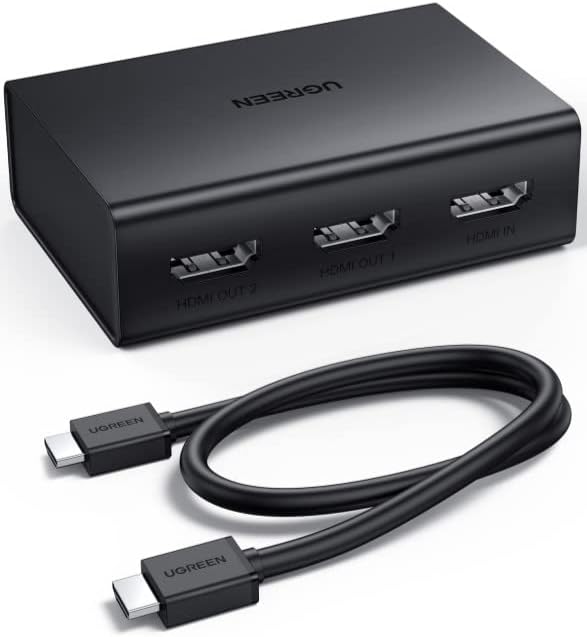
Sharing one cable box, media player or console feed with a TV in another room does not require a second subscription or a smart TV app – it just needs a splitter that duplicates the signal. The UGREEN 90513 HDMI SPLITTER 1 IN 2 OUT4K60Hz (Rs. 6,450) is built exactly for this: it is described as letting you “enjoy the same content on two TVs in different rooms with ease.” It supports 4K@60Hz with HDR and HDCP 2.2/1.4, and also handles 4K@30Hz or 1080P@120Hz depending on your source and cables.
It also supports HDMI CEC, so the connected TV’s own remote can control basic functions on the source device, and its compact 77x52x24mm size tucks away behind a TV stand easily. If you eventually want to add a third or fourth room, the same splitter can be cascaded to reach up to 8 displays total.
Other 1-in-2 options depending on budget
If you want a no-frills, budget-friendly alternative, the UNITEK V1130A01-EU 4K HDMI SPLITTER 1 IN 2 OUT ULTRA HD (Rs. 7,896) is plug-and-play with no drivers required and supports 4K Ultra HD resolution, making it a straightforward pick for a second TV.
At the more premium end, the UGREEN 50710 HDMI 2.0 SPLITTER BOX (Rs. 15,160) is built with a durable metal housing for heat dissipation and a powered design for stable signal transmission, supporting 4K UHD up to 60Hz along with HDR, 3D and HDCP. It is a larger, boxier unit than the compact 90513, but the metal housing and powered design are aimed at long-term reliability.
Setup basics
- Connect your source device (cable box, streaming player, console) into the splitter’s single input port.
- Run one HDMI cable from each output port to each TV.
- Remember these units mirror the picture – both TVs will always show the exact same content, so you cannot watch two different channels from one splitter.
- For longer cable runs to a second room, a powered unit such as the UGREEN 50710 is designed with signal stability in mind.
Frequently Asked Questions
Can both TVs show different channels at the same time?
No. A splitter mirrors one source, so both TVs always display the identical picture. For independent content on each screen you would need two separate source devices instead of a splitter.
Will this work if one TV is older and only supports 1080p?
Because a splitter sends the same signal to every output, mixed-resolution setups can be limited by what your source and cabling negotiate. The UGREEN 90513 lists support down to 1080P@120Hz in addition to 4K@60Hz and 4K@30Hz, giving it some flexibility across different TVs.
What is the price range for a two-TV splitter setup?
Prices here range from Rs. 6,450 for the UGREEN 90513 up to Rs. 15,160 for the premium metal-housed UGREEN 50710, with the UNITEK V1130A01-EU sitting in between at Rs. 7,896.
Do I need external power for this?
The UNITEK V1130A01-EU is plug-and-play with no external power needed. The UGREEN 50710 is described as having a “powered design” for more stable long-term signal transmission, which is worth considering for a permanent two-room installation.
Leave a Reply